Access to health coverage shouldn’t depend on navigating confusing systems or keeping up with paperwork. Yet for millions of people—especially low-income, elderly, and disabled populations—retaining Medicaid coverage can be just as challenging as getting approved in the first place. Caseworkers sit at the center of this process, but the tools they rely on are often outdated, manual, and disconnected from how government services work today. CivicAssist is a concept project that explores how AI can responsibly support public-sector caseworkers by reducing administrative burden and improving the renewal experience for clients.
MY ROLE
User Research
Journey Mapping
Wireframing
System Design
TOOLS
Figma
Figma Make
Claude
Chat-GPT
PROBLEM
Caseworkers must process large volumes of time-sensitive Medicaid renewals using disconnected systems that require constant manual tracking and verification. These inefficiencies lead to preventable delays that can cause eligible clients to lose their coverage.
RESEARCH
When the federal government ended the Public Health Emergency in 2023, states were required to stop their temporary automatic, continuous Medicaid coverage and return to regular renewal rules. This sudden shift, known as “unwinding”, created an unprecedented surge in renewal volume, overwhelming systems and staff across the country. As a result:
4.1M
people lost Medicaid coverage due to procedural issues or pending statuses, not clear cut ineligibility
20%
of all renewal denials were due to paper or communication problems, not clear cut ineligibility
Caseworker Pain Points
The influx of renewal cases compounded on preexisting issues:
Staffing shortages and high turnovers leave case workers with extremely high caseloads and limited bandwidth
Many legacy systems require navigating multiple screens, re-entering the same data repeatedly, or piecing together information from different modules
Workers spend significant time tracking missing documents, verifying income manually, and following up with clients. Poorly structured dashboards make it hard to prioritize which cases truly need attention
Policies change rapidly, but many systems don't update in real time. Workers rely on inboxes, sticky notes, and manual searches to stay compliant
Insight Synthesis
Based on the research conducted I've found three key insights.
Caseworkers need help prioritizing work.
High case volume + unclear queues = delayed renewals and preventable procedural closures.
Manual, repetitive tasks consume large portions of the workday.
Document hunting, data entry, and navigating outdated systems take time away from actually reviewing cases.
AI has the potential to support — not replace — the human role.
AI can surface urgent cases, pre-fill information, verify data, and guide workers through complex decisions, reducing friction
USER JOURNEY
Caseworker
Jennifer Gomez

scenario
It’s a Monday morning and Jennifer has a stack of new cases on her desk as well as expiring cases on within the digital system to work on. She also some home visits to make and emails to respond to all before the day is over.
expectations
She plans to review at least 10 cases
She expects to leave the office by 2pm to begin her first home visit
stage 1
GOALS
ACTIONS
THOUGHTS
PAIN POINTS
EMOTIONS
opportunities
stage 1
Jennifer wants to review 10 cases before her 1pm lunch break. She want to start with cases expiring soon
She logs onto the main online system where the case and a majority of the client data
She sorts the cases by date and selects 10 to work on
Will she be able to surface the necessary information for each review?
Many clients have missing required documents, but the system cross lists them as active recipients of other public assistance (SNAP, Medicare, Cash Assistance, etc.)
Neutral
Automatically present the cases/workflow to Jennifer, just one click, no extra decisions
stage 2
Continue to work on the cases, finding the missing documents
Of the clients who are active recipients of other resources, she can access those documents by navigating to secondary systems, so she does that
She is not familiar with the secondary systems, since her department focuses most of her workflow on the primary one. Can she navigate
It’s taking her upwards of 30 minutes to locate the required documents. At this rate, she won’t be finished until pm and has to work through her lunch hour
Fustrated
Incorporate the necessary client data from secondary systems into the primary one
stage 3
In an attempt to save time, she decides to simply call some clients to have them send over their required documents
In an attempt to save time, she decides to simply call some clients to have them send over their required documents, and as expected some don’t pick up. She follows up with emails asking for the required documents, but has to manually type each email.
She wonders emailing/calling is actually quicker than searching the database. Should she have
She spent a majority of her day navigating through systems / paperwork rather than actually reviewing cases
Frustrated
Have AI automatically surface which documents are required and send document reminders to clients with only a click
stage 4
Complete mundane yet necessary administrative tasks like responding to email
Responds to each email, manually drafting up text, adding home visits/calls to her calendar
Should she save these tasks for tomorrow or complete them off the clock at home?
She’s had to stop working on the cases in order to complete these tasks
Neutral
Offload to AI, provide comprehensive assistance by scanning emails and automatically creating events when appropriate
stage 5
Leave the office and make her home visits
She opens up her calendar to find the clients’ address and puts them into Apple Maps
What’s the best route to take in order to meet her clients at a reasonable time?
It took 10 minutes to figure out the be best route, this setback extends her day even further
Neutral
Offload this task to AI
DESIGN FOUNDATION
When I began this project, I had a clear sense of the layout and structure I wanted to create. Because I planned to use FigmaMake for text-to-design generation, I intentionally approached this phase differently from a traditional wireframing process. Rather than producing detailed wireframes upfront, my goal was to establish the overall framework and then refine the generated layouts as the design took shape.
Low-Fi Wireframes
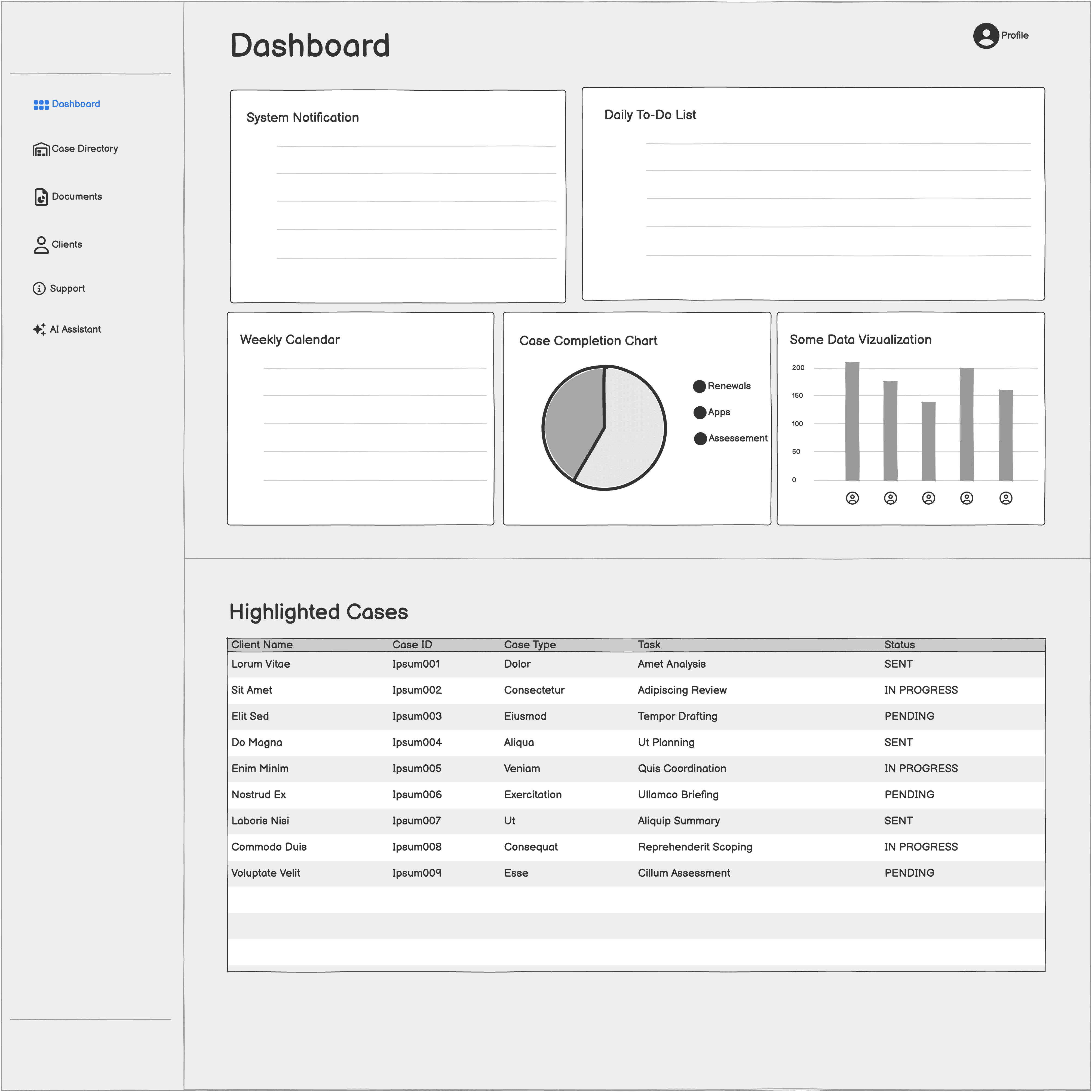
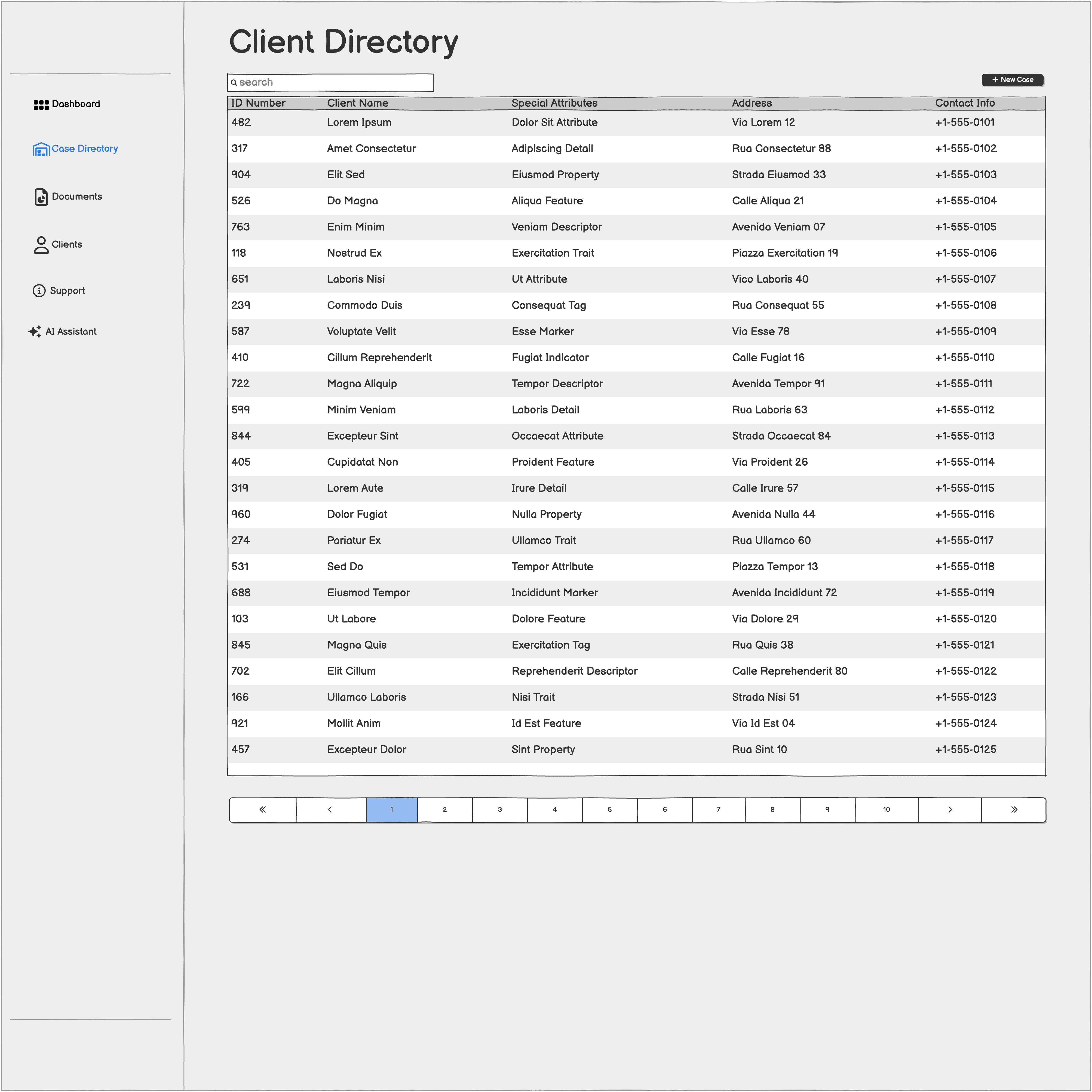
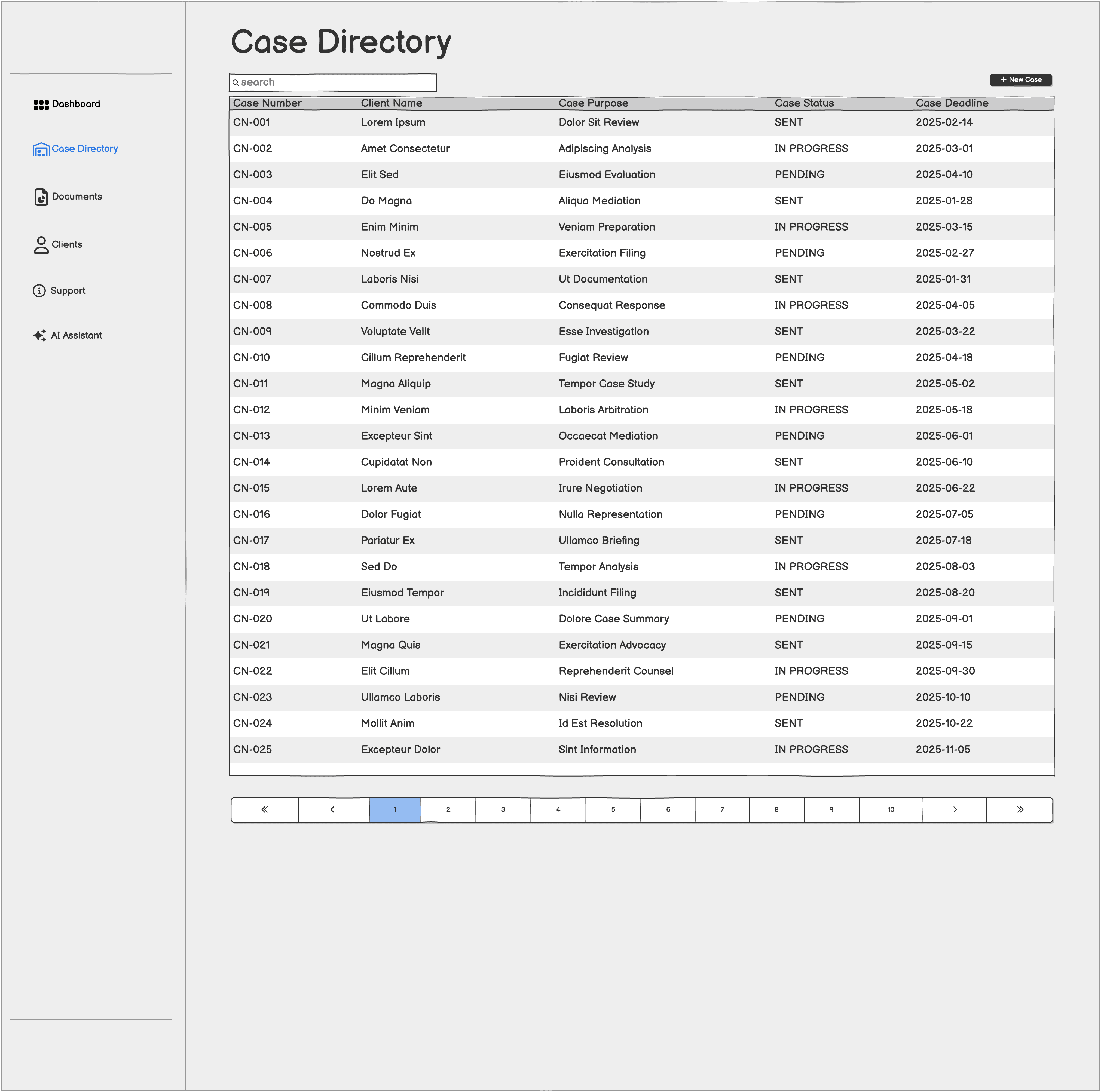
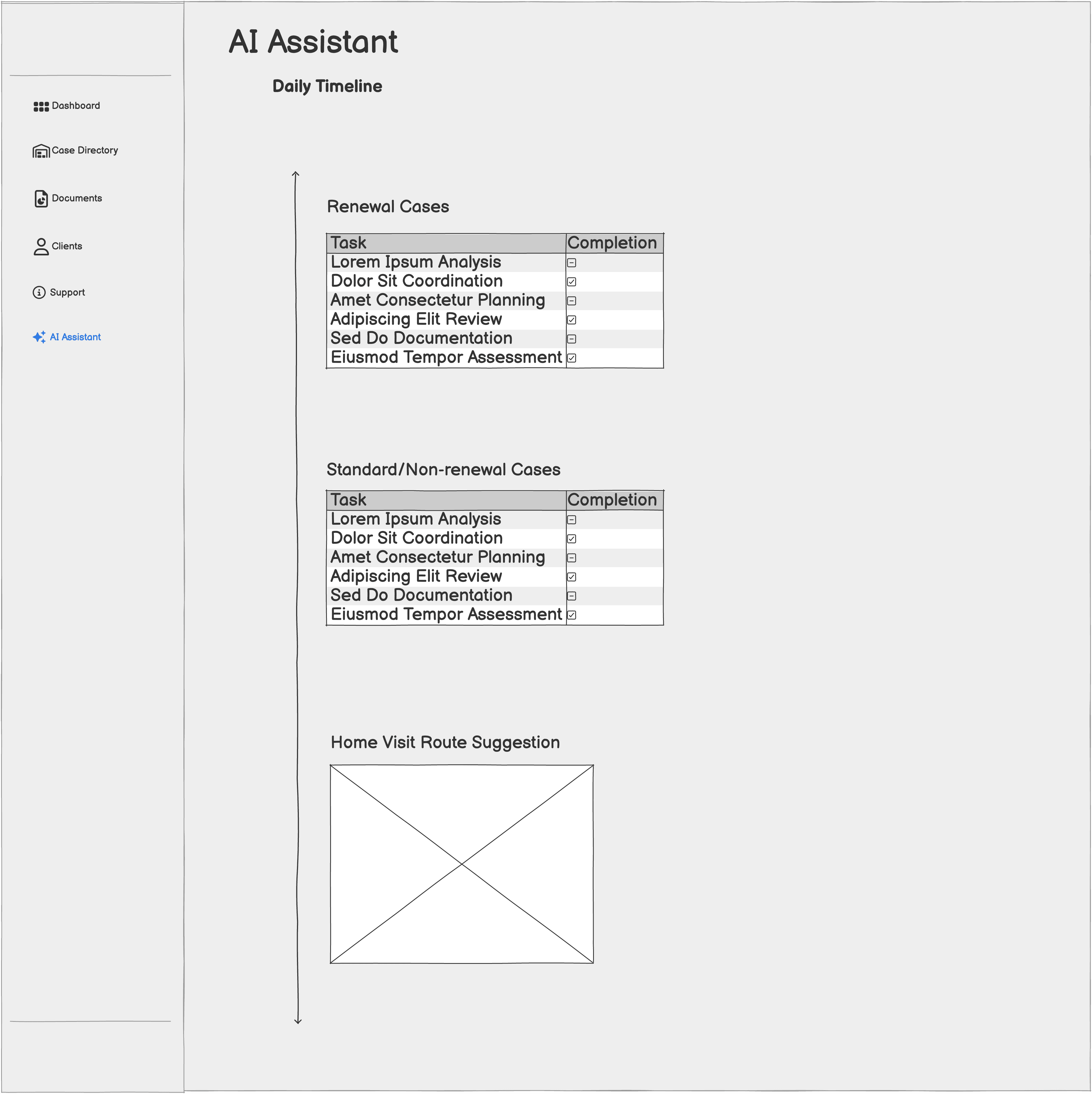
Click to expand images
Template
Above is the template I started from.
No design is created in a vacuum, and it’s not always efficient to start completely from scratch. For this project, I began with a compatible template that closely matched the structure and visual direction of my early prototype sketches. Using this template gave me a solid foundation to prompt against and accelerated the initial build.
However, the template had several limitations I needed to resolve. Many expected interactions were static, key elements weren’t clickable, and some features were irrelevant or misaligned with the needs of caseworkers. These gaps required significant refinement.
From this starting point, I generated over 500 prompt iterations to evolve the design into what ultimately became CivicAssist, using tools like Claude to refine prompt structure and improve prompt clarity. The process was far from linear. When text-based prompting reached its limits or produced inconsistent results, I shifted into Figma to manually refine components and layouts, then imported those updated designs back into FigmaMake so the model could better understand and reproduce the intended direction.
FINAL DESIGNS
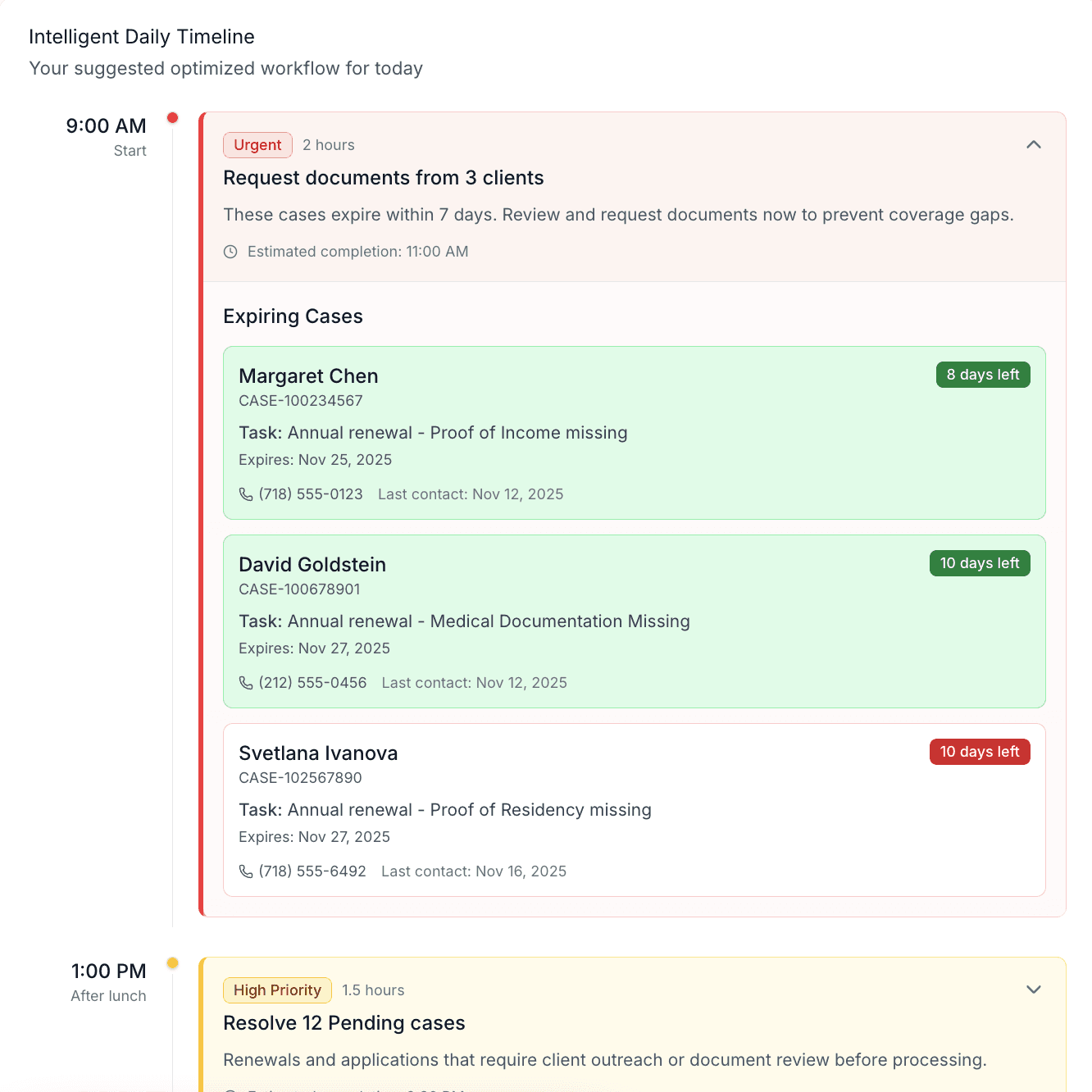
The final design of CivicAssist brings together the core principles uncovered during research: reducing manual work, clarifying priorities, and supporting complex decisions while keeping human judgement in the loop. The product includes three key features that shape the experience: an optimized case timeline, an AI chatbox, and a Cases Needing Action card. Each feature uses artificial intelligence to highlight what matters most and guides workers toward the next appropriate step.
Optimized Timeline
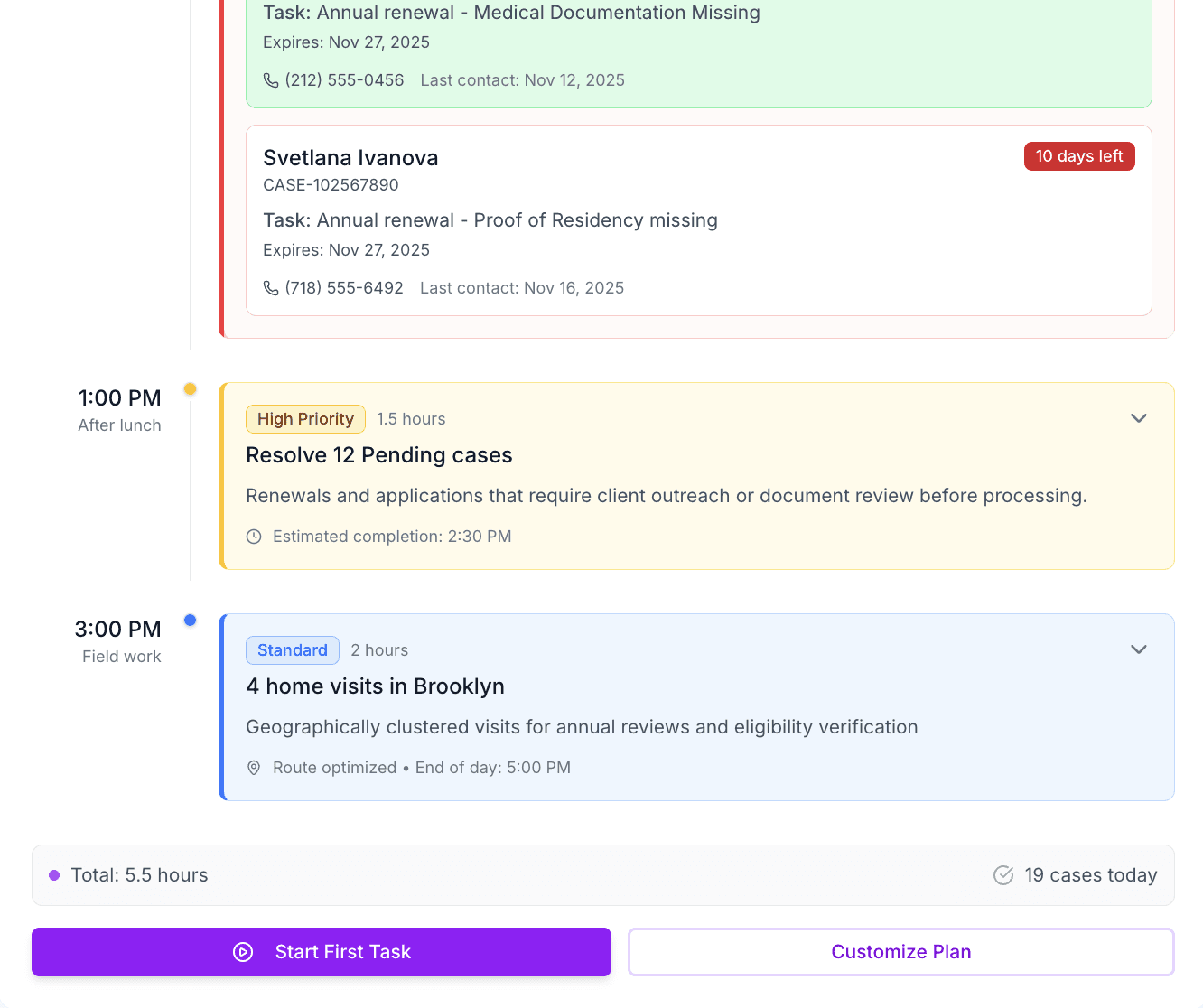
The Optimized Timeline is a smart workflow tool that organizes each case into a sequence of bite-sized tasks that can be completed more quickly and with fewer errors.
The timeline’s AI engine analyzes state rules to determine exactly which verification documents are required and auto-completes every step it can using verified data sources. It then presents the caseworker with only the remaining tasks that require action. Once the workflow is generated, the timeline orders cases using its urgency and case’s confidence-score so cases that can be safely auto-processed rise to the top while more complex cases are clearly flagged.
The timeline is fully customizable. Caseworkers can reorder, modify, or add any task. The tool also analyzes the worker’s emails, calendar, and pending tasks to uncover hidden responsibilities and directly integrate them into the timeline—aiding focus and reducing cognitive load.
Read Less
Breaks down cases into bite-sized tasks, provides a clear action plan for caseworkers
Uses trusted sources to find necessary information/documentation and auto-completes parts of the renewal process
Orders cases based on urgency level and confidence score
Fully customizable, caseworkers can reorder, modify, or remove any tasks.
Analyzes and incorporates caseworker’s emails and calendar, surfacing seemingly hidden tasks
Read More
AI Chatbox
Chat boxes often feel like the obligatory “AI add-on” that no one asked for, but CivicAssist treats it as a serious productivity tool. Inspired by real government use cases (New Jersey’s internal AI support tools), the embedded chat box is designed to be practical and genuinely helpful.
It stays out of the way but is always available for on-the-spot assistance: drafting client messages, generating call scripts, summarizing case histories, writing checklists, explaining eligibility rules, and creating new tools. It's paired with a built-in prompting library that helps caseworkers understand what they can ask or create. This ensures the tool supports real work endeavors instead of becoming another system to understand.
Cases Needing Action Card
In real life, caseloads can exceed 150–200 clients per worker, making case directories far more extensive than what’s shown in this project. This card provides a sharper, more focused view of that directory by surfacing cases that are at risk of slipping through the cracks, such as those with overdue documents, stalled reviews, expiring benefits, or unresolved supervisor decisions. It essentially gives caseworkers a high-level view that the standard directory doesn't offer initally.
Machine learning identifies these emerging issues and presents them in a list so caseworkers can intervene before delays lead to coverage gaps. The card also offers foresight into which cases are likely to appear next in the Optimized Timeline.
AI Behind the Scenes
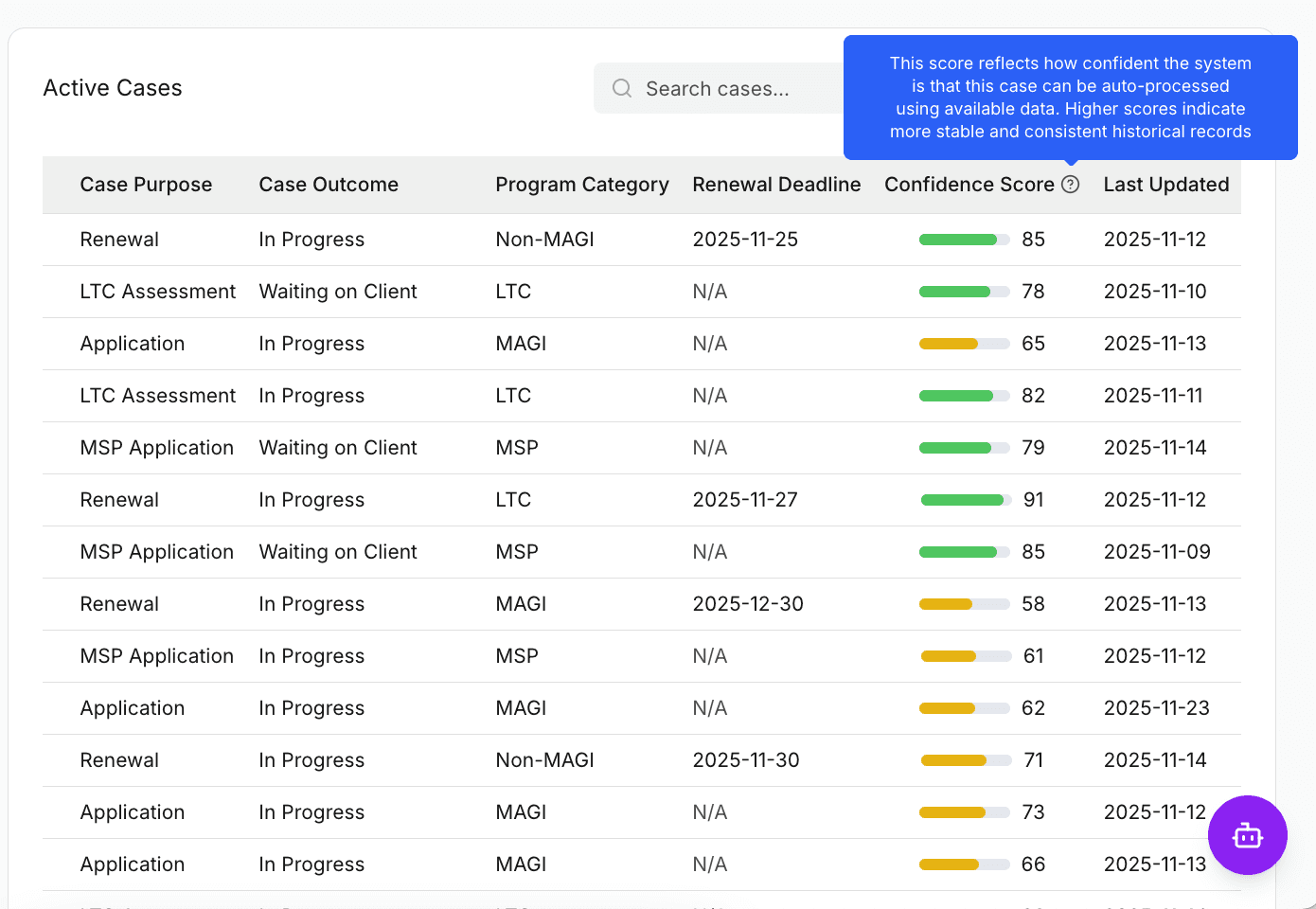
Confidence Scores
Every case is assigned a confidence score, which is an algorithmically generated numeric value that reflects how certain the system is that a renewal can be auto-processed using existing, trusted data. This score is especially valuable for renewal cases, which are a major source of preventable coverage loss. Many elderly, disabled, and low-income clients have stable eligibility yet still lose benefits due to paperwork barriers or missed communications.
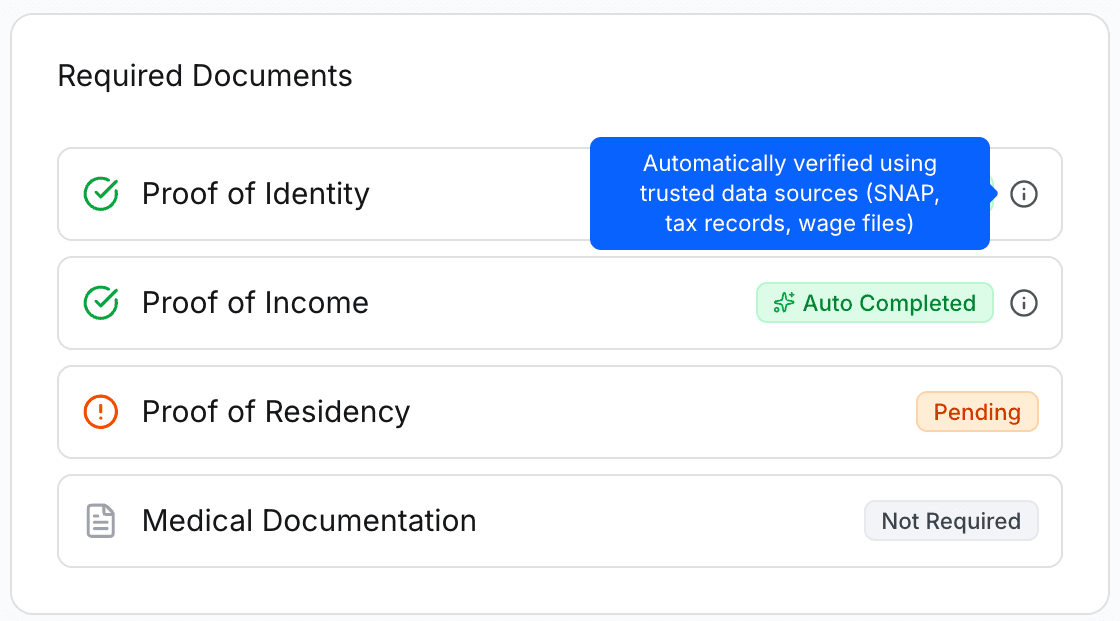
Auto Completed Tasks / Trusted Sources
Medicaid agencies often have access to data from other government systems, but caseworkers typically need to search for that information manually. In CivicAssist, AI retrieves the required documents directly from these verified sources and automatically completes any steps it can. This reduces the burden on both clients and caseworkers by eliminating unnecessary requests and minimizing manual follow-up.
LIMITATIONS
Designing CivicAssist through FigmaMake introduced several constraints that limit how broadly the prototype can be applied today. I did not have direct access to actual caseworkers for sustained usability testing, so many interaction patterns are based on secondary research and policy analysis rather than real-world observational data. As a result, some workflow choices or terminology may not perfectly align with the varied practices across states or the rapid pace of a busy eligibility unit. I also had no exposure (not even a glimpse) into the internal case management tools used by Medicaid agencies. Instead, I relied on publicly available information from private case management platforms. Even limited access to real systems would likely have influenced the structure, terminology, and flow of this project.
FigmaMake itself introduced additional limitations. Text-to-design accelerated early ideation but often produced inconsistent interactions that required extensive manual correction and intentional scope-setting to avoid misleading UX patterns. There were moments where it felt easier to abandon FigmaMake entirely and continue designing in standard Figma, but the advanced micro-interactions generated through the tool ultimately made it worthwhile.
If this concept were developed in a real government environment, further limitations would emerge. Securing approval for any automated workflows would require significant engineering and regulatory work. These constraints would inevitably shape which AI features could be implemented, how confident the system could be in its recommendations, and how much autonomy workers would be comfortable granting it.
REFLECTIONS
The limitations of this project directly shaped a set of conservative, research-informed design decisions that prioritize clarity, safety, and meaningful human control. Because I didn’t have access to real caseworkers or internal Medicaid systems, I had to continuously ask: What can I design that meaningfully solves the problem statement given the information I do have? That question pushed me toward features whose value holds across states, tools, and workflows. The daily Optimized Timeline emerged from this constraint, it is a simple, universal structure that can sit on top of many possible case-management environments while still being helpful
Why Include a Chatbox?
The inclusion of an AI chatbox was another intentional decision. Although chatbots are often overused or treated as trendy add-ons, I included one because it provides unique flexibility that interfaces alone can’t offer. Casework is highly variable, and workers often face exceptions that rigid UI patterns cannot anticipate. A chatbox tool creates room for edge cases. Workers can create their own tools, ask for guidance, generate summaries, retrieve policy rules, or draft communications without navigating multiple pages. To reduce the cognitive burden of prompting, I included suggested prompts and a dedicated guidance page, helping workers understand what the chatbox can actually do rather than guessing its capabilities.
Looking ahead, if CivicAssist were developed as a real system, the chatbox could evolve into a more agent-like assistant that builds small, personalized tools on demand. For example, a worker could ask it to generate a quick eligibility-check helper or a custom script that flags a specific case condition. These micro-tools could then live within the “AI Assistant” space, enabling a more adaptive and worker-driven ecosystem. Even in concept form, designing toward that possibility pushed me to think critically about scope, transparency, and how to support powerful AI features without overwhelming an already overloaded workforce.